
Statistics and probability relationship#
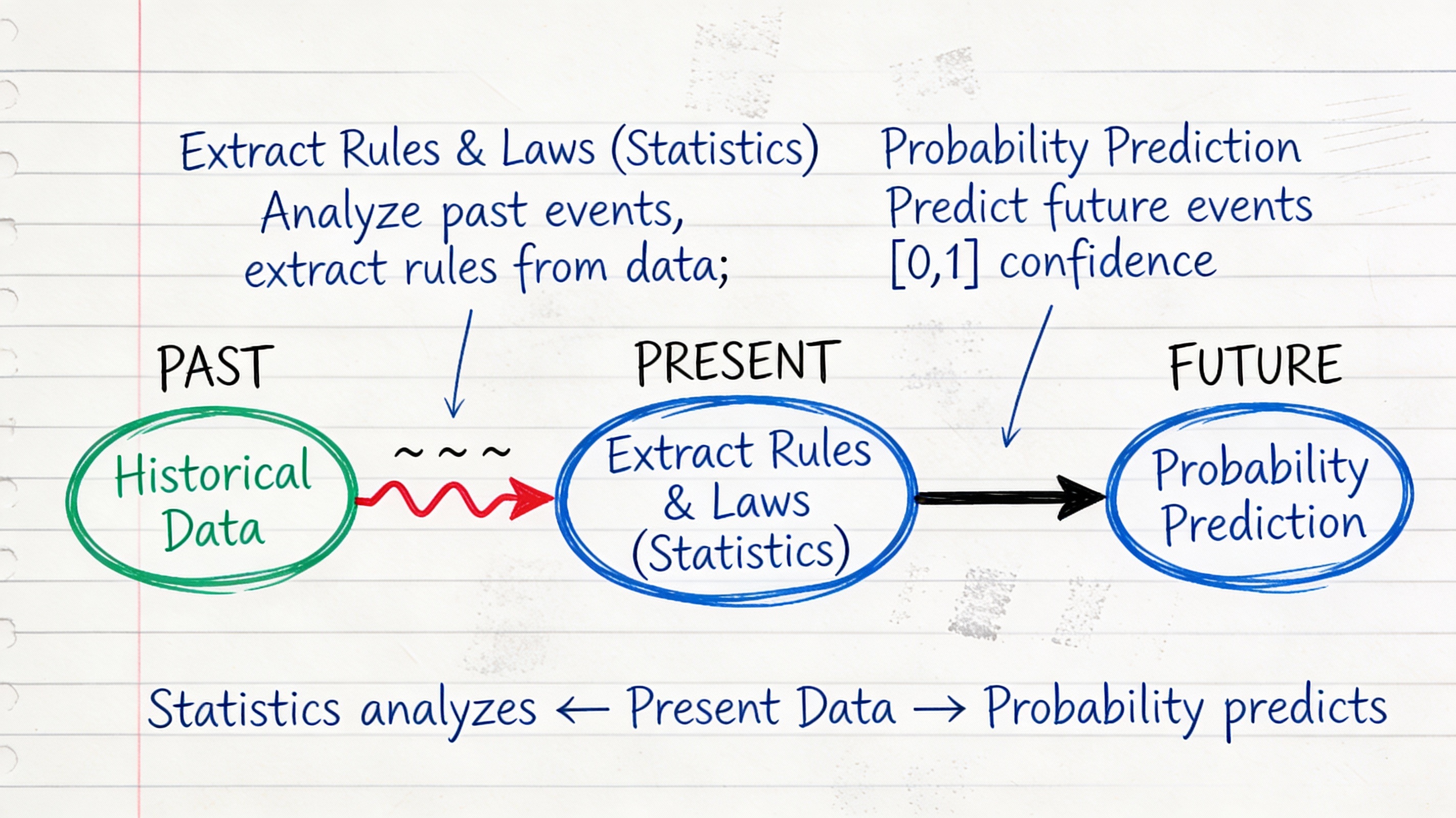
Before we can analyze data, we need to understand what data is and how we represent it.
What is a Dataset?#
A dataset is a collection of descriptions of different instances of the same phenomenon. These descriptions could take a variety of forms, but it is important that they are descriptions of the same thing.
Examples of Datasets#
Rainfall measurements: Daily rainfall in a garden over many years
Height measurements: Height of each person in a room
Family sizes: Number of children in each family on a block
Preferences: Whether 10 classmates prefer to be rich or famous
Student records: Test scores, attendance, demographics for students in a class
Key Characteristic#
All items in a dataset must be:
Descriptions of the same type of entity
Measured or recorded in a consistent way
Comparable to each other
❌ Not a dataset: [height of person 1, weight of person 2, age of person 3]
✅ Valid dataset: [height of person 1, height of person 2, height of person 3]
Lets see the operations on datasets#
Union of Datasets#
Given two datasets A and B, the union of A and B, denoted as A ∪ B, is a dataset that contains all the unique elements from both A and B.
A={1,2,3}
B={3,4,5}
print("A ∪ B =", A.union(B))
A ∪ B = {1, 2, 3, 4, 5}
Intersection of Datasets#
Given two datasets A and B, the intersection of A and B, denoted as A ∩ B, is a dataset that contains only the elements that are present in both A and B.
print("A ∩ B =", A.intersection(B))
A ∩ B = {3}
Difference of Datasets#
Given two datasets A and B, the difference of A and B, denoted as A - B, is a dataset that contains the elements that are in A but not in B.
print("A - B =", A.difference(B))
A - B = {1, 2}
Universal Set \(\Omega\)#
In set theory, the universal set, often denoted by the symbol \(\Omega\) (omega), is the set that contains all the objects or elements under consideration for a particular discussion or problem. It serves as a reference point for defining other sets and their relationships. For example, if we are discussing the properties of natural numbers, the universal set \(\Omega\) would include all natural numbers: {0, 1, 2, 3, …}. If we are discussing the properties of geometric shapes, the universal set \(\Omega\) might include all possible geometric shapes. The universal set is important because it provides a context for understanding subsets, complements, and other set operations. Any set discussed within a particular context is considered a subset of the universal set \(\Omega\).
Complement of a Dataset#
Given a dataset A and the universal set Ω, the complement of A, denoted as A’, is the dataset that contains all the elements that are in Ω but not in A.
omg = {1,2,3,4,5}
C = {2,3}
C_complement = omg.difference(C)
print("The complement of C is:", C_complement)
The complement of C is: {1, 4, 5}
Disjoint Datasets#
Two datasets A and B are said to be disjoint if they have no elements in common. In other words, their intersection is the empty set. For example, if:
Dataset A = {1, 2, 3}
Dataset B = {4, 5, 6}
Then, A and B are disjoint because: A ∩ B = {} (the empty set)
Data Items and D-Tuples#
A dataset consists of \(N\) data items, where each data item is a d-tuple - an ordered list of \(d\) elements.
Notation Conventions#
\(N\): Number of items in the dataset (always)
\(d\): Number of elements in each tuple (always the same for all tuples)
\(\{x\}\): The entire dataset
\(x_i\): The \(i\)-th data item
\(x_i^{(j)}\): The \(j\)-th component of the \(i\)-th data item
Example: Students Dataset#
Consider 5 students with (height in cm, weight in kg, age in years):
Student |
Height |
Weight |
Age |
|---|---|---|---|
\(x_1\) |
165 |
55 |
20 |
\(x_2\) |
170 |
62 |
21 |
\(x_3\) |
168 |
58 |
20 |
\(x_4\) |
175 |
70 |
22 |
\(x_5\) |
172 |
65 |
21 |
Here:
\(N = 5\) (five students)
\(d = 3\) (three measurements per student)
\(x_1 = (165, 55, 20)\) (first student’s data)
\(x_3^{(2)} = 58\) (third student’s weight)
# Example dataset: measurements of students
# Each student has three measurements: height (cm), weight (kg), age (years)
data = [
    (165, 55, 20),  # Student 1
    (170, 70, 22),  # Student 2
    (180, 80, 21),  # Student 3
    (175, 65, 23),  # Student 4
]
# Number of students (n) and measurements per student (d)
n = len(data)
d = len(data[0]) if n > 0 else 0
print(f"Number of students: {n}, Number of measurements per student: {d}")
# Accessing specific data points
x1 = data[0]  # First student's data
x3_weight = data[2][1]  # Third student's weight
print(f"First student's data: {x1}")
print(f"Third student's weight: {x3_weight} kg")
Number of students: 4, Number of measurements per student: 3
First student's data: (165, 55, 20)
Third student's weight: 80 kg
Types of Data#
Data comes in different types, each requiring different analysis techniques.
1. Categorical Data#
Categorical data consists of values from a fixed set of categories with no inherent numerical meaning.
Examples:
Gender: {Male, Female, Other}
Color: {Red, Blue, Green, Yellow}
Country: {USA, Canada, Mexico, …}
Yes/No responses
Characteristics:
Cannot meaningfully compute mean or standard deviation
Can count frequencies
Can compute mode (most common category)
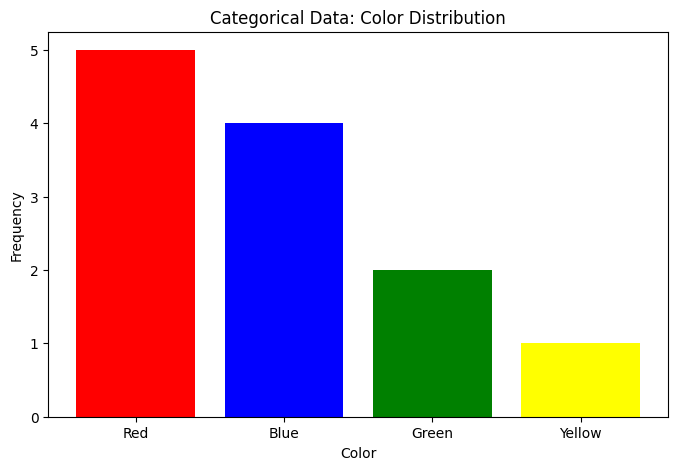
Use bar charts for visualization
import numpy as np
import matplotlib.pyplot as plt
from collections import Counter

# Categorical data example
colors = ['Red', 'Blue', 'Red', 'Green', 'Blue', 'Red',
          'Yellow', 'Blue', 'Red', 'Blue', 'Green', 'Red']

# Count frequencies
counts = Counter(colors)
print("Frequencies:", counts)
print("Mode:", counts.most_common(1)[0][0])

# Visualize
categories = list(counts.keys())
frequencies = list(counts.values())

plt.figure(figsize=(8, 5))
plt.bar(categories, frequencies, color=['red', 'blue', 'green', 'yellow'])
plt.xlabel('Color')
plt.ylabel('Frequency')
plt.title('Categorical Data: Color Distribution')
plt.show()
Frequencies: Counter({'Red': 5, 'Blue': 4, 'Green': 2, 'Yellow': 1})
Mode: Red
2. Ordinal Data#
Ordinal data consists of categories with a meaningful order or ranking, but the intervals between categories are not necessarily equal.
Examples:
Education Level: {High School, Bachelor’s, Master’s, PhD}
Satisfaction Rating: {Very Unsatisfied, Unsatisfied, Neutral, Satisfied, Very Satisfied}
Military Ranks: {Private, Corporal, Sergeant, Lieutenant, Captain}
Characteristics:
Can determine order (e.g., Master’s > Bachelor’s)
Cannot compute mean or standard deviation meaningfully
Can compute median and mode
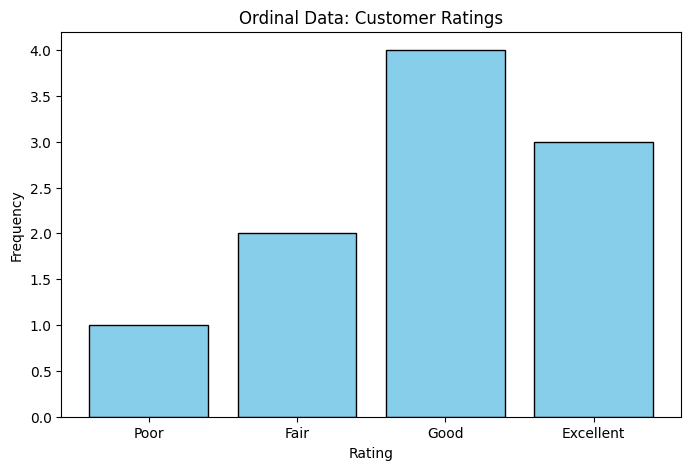
Use bar charts or ordered plots for visualization
# Ordinal data example
ratings = ['Good', 'Excellent', 'Fair', 'Good', 'Poor',
           'Excellent', 'Good', 'Good', 'Fair', 'Excellent']

# Define order
order = ['Poor', 'Fair', 'Good', 'Excellent']

# Map to numbers for analysis
rating_map = {rating: i for i, rating in enumerate(order)}
numeric_ratings = [rating_map[r] for r in ratings]

print(f"Median rating: {order[int(np.median(numeric_ratings))]}")
print(f"Mode rating: {Counter(ratings).most_common(1)[0][0]}")

# Visualize
rating_counts = Counter(ratings)
ordered_counts = [rating_counts[r] for r in order]

plt.figure(figsize=(8, 5))
plt.bar(order, ordered_counts, color='skyblue', edgecolor='black')
plt.xlabel('Rating')
plt.ylabel('Frequency')
plt.title('Ordinal Data: Customer Ratings')
plt.show()
Median rating: Good
Mode rating: Good
3. Continuous Data#
Continuous data consists of numerical values that can take any value within a range. These values have meaningful intervals and ratios.
Examples:
Height in centimeters
Weight in kilograms
Temperature in degrees Celsius
Time in seconds
Characteristics:
Can compute mean, median, mode, standard deviation
Can perform arithmetic operations
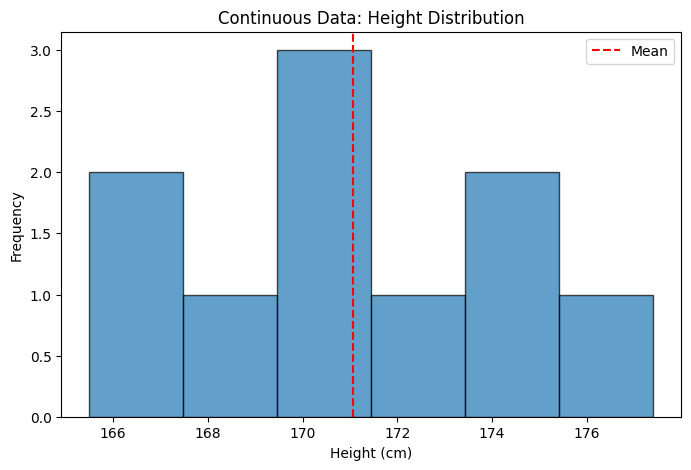
Use histograms, box plots, scatter plots for visualization
# Continuous data example
heights = np.array([165.5, 170.2, 168.7, 175.1, 172.3,
                    169.8, 173.6, 177.4, 171.2, 166.9])

print(f"Mean height: {np.mean(heights):.2f} cm")
print(f"Median height: {np.median(heights):.2f} cm")
print(f"Std deviation: {np.std(heights):.2f} cm")

plt.figure(figsize=(8, 5))
plt.hist(heights, bins=6, edgecolor='black', alpha=0.7)
plt.xlabel('Height (cm)')
plt.ylabel('Frequency')
plt.title('Continuous Data: Height Distribution')
plt.axvline(np.mean(heights), color='r', linestyle='--', label='Mean')
plt.legend()
plt.show()
Mean height: 171.07 cm
Median height: 170.70 cm
Std deviation: 3.47 cm
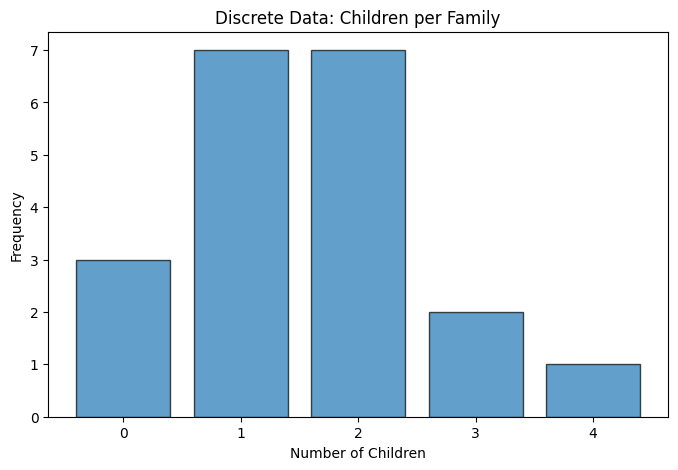
4. Discrete Data#
Discrete data consists of numerical values that can only take specific, separate values (often integers). There are gaps between possible values.
Examples:
Number of children in a family
Number of cars in a parking lot
Number of students in a class
Number of goals scored in a soccer match
Characteristics:
Can compute mean, median, mode, standard deviation
Can perform arithmetic operations
Use bar charts or dot plots for visualization
# Discrete data example
children_per_family = np.array([0, 1, 2, 1, 3, 2, 1, 0, 2, 1,
                                 2, 4, 1, 2, 3, 1, 2, 0, 1, 2])

print(f"Mean: {np.mean(children_per_family):.2f} children")
print(f"Median: {np.median(children_per_family):.0f} children")
print(f"Mode: {Counter(children_per_family).most_common(1)[0][0]} children")

plt.figure(figsize=(8, 5))
values, counts = np.unique(children_per_family, return_counts=True)
plt.bar(values, counts, edgecolor='black', alpha=0.7)
plt.xlabel('Number of Children')
plt.ylabel('Frequency')
plt.title('Discrete Data: Children per Family')
plt.xticks(values)
plt.show()
Mean: 1.55 children
Median: 2 children
Mode: 1 children
Dealing with missing data#
When dealing with missing data in datasets, there are several strategies you can employ to handle the gaps effectively. Here are some common approaches:
Remove Missing Data: If the amount of missing data is small, you can simply remove the records with missing values. However, this may lead to loss of valuable information if a significant portion of the dataset is affected.
Imputation: Replace missing values with estimated values based on other available data. Common imputation methods include:
Mean/Median/Mode Imputation: Replace missing values with the mean, median, or mode of the respective feature.
Regression Imputation: Use regression models to predict and fill in missing values based on other features.
K-Nearest Neighbors (KNN) Imputation: Use the values from similar instances (neighbors) to fill in missing data.
Use Algorithms that Handle Missing Data: Some machine learning algorithms can handle missing data internally, such as decision trees and random forests.
import pandas as pd

# Dataset with missing values
data = pd.DataFrame({
    'Height': [165, 170, 168, np.nan, 172],
    'Weight': [55, 62, np.nan, 70, 65],
    'Score': [85, 90, 88, 92, np.nan]
})

print("Original data:")
print(data)
print(f"\nMissing values:\n{data.isna().sum()}")

# Strategy 1: Drop rows with any missing
data_dropped = data.dropna()
print(f"\nAfter dropping: {len(data_dropped)} rows")

# Strategy 2: Fill with mean
data_filled = data.fillna(data.mean())
print("\nAfter filling with mean:")
print(data_filled)
Original data:
   Height  Weight  Score
0   165.0    55.0   85.0
1   170.0    62.0   90.0
2   168.0     NaN   88.0
3     NaN    70.0   92.0
4   172.0    65.0    NaN

Missing values:
Height    1
Weight    1
Score     1
dtype: int64

After dropping: 2 rows

After filling with mean:
   Height  Weight  Score
0  165.00    55.0  85.00
1  170.00    62.0  90.00
2  168.00    63.0  88.00
3  168.75    70.0  92.00
4  172.00    65.0  88.75
Loading and Exploring Datasets#
Reading CSV Files#
import pandas as pd
import io

# Read CSV
df = pd.read_csv('https://raw.githubusercontent.com/chebil/stat/main/part1/data.csv')

# Basic exploration
print(df.head())  # First 5 rows
print(df.info())  # Data types and missing values
print(df.describe())  # Summary statistics
      Name  Age  Score
0    Alice   20     85
1      Bob   21     90
2  Charlie   20     88
3    David   22     92
4      Eve   21     87
<class 'pandas.core.frame.DataFrame'>
RangeIndex: 5 entries, 0 to 4
Data columns (total 3 columns):
 #   Column  Non-Null Count  Dtype
---  ------  --------------  -----
 0   Name    5 non-null      object
 1   Age     5 non-null      int64
 2   Score   5 non-null      int64
dtypes: int64(2), object(1)
memory usage: 252.0+ bytes
None
            Age      Score
count   5.00000   5.000000
mean   20.80000  88.400000
std     0.83666   2.701851
min    20.00000  85.000000
25%    20.00000  87.000000
50%    21.00000  88.000000
75%    21.00000  90.000000
max    22.00000  92.000000
Reading from dictionary#
import pandas as pd
import numpy as np

# From dictionary
data = {
    'Name': ['Alice', 'Bob', 'Charlie', 'David'],
    'Age': [20, 21, 20, 22],
    'Score': [85, 90, 88, 92]
}
df = pd.DataFrame(data)

print(df)
print(f"\nDataset has {len(df)} items (N = {len(df)})")
print(f"Each item has {len(df.columns)} features (d = {len(df.columns)})")
      Name  Age  Score
0    Alice   20     85
1      Bob   21     90
2  Charlie   20     88
3    David   22     92

Dataset has 4 items (N = 4)
Each item has 3 features (d = 3)
Common Data Sources#
1. Surveys and Questionnaires#
Collect specific information from individuals
Often mix categorical and continuous data
Example: Customer satisfaction surveys
2. Sensors and Measurements#
Automated data collection
Usually continuous or discrete
Example: Temperature sensors, GPS coordinates
3. Databases and Records#
Existing organizational data
Structured format
Example: Hospital records, sales transactions
4. Web Scraping#
Extract data from websites
Requires cleaning and processing
Example: Product prices, social media data
5. Public Datasets#
Freely available for research and education
Often well-documented
Examples:
Best Practices for Working with Datasets#
1. Always Explore First#
# Check first few rows
print(df.head())

# Check data types
print(df.dtypes)

# Check for missing values
print(df.isna().sum())

# Summary statistics
print(df.describe())
      Name  Age  Score
0    Alice   20     85
1      Bob   21     90
2  Charlie   20     88
3    David   22     92
Name     object
Age       int64
Score     int64
dtype: object
Name     0
Age      0
Score    0
dtype: int64
             Age      Score
count   4.000000   4.000000
mean   20.750000  88.750000
std     0.957427   2.986079
min    20.000000  85.000000
25%    20.000000  87.250000
50%    20.500000  89.000000
75%    21.250000  90.500000
max    22.000000  92.000000
2. Visualize Early#
Plot histograms for continuous variables
Create bar charts for categorical variables
Look for outliers and patterns
3. Document Your Data#
What does each column represent?
What are the units?
When/how was data collected?
Are there known issues?
4. Clean Your Data#
Handle missing values
Remove duplicates
Fix data type issues
Deal with outliers
# Example cleaning pipeline
df_clean = df.copy()

# Remove duplicates
df_clean = df_clean.drop_duplicates()

# Handle missing values (only for numeric columns)
numeric_cols = df_clean.select_dtypes(include=[np.number]).columns
df_clean[numeric_cols] = df_clean[numeric_cols].fillna(df_clean[numeric_cols].mean())

# Convert types if needed
df_clean['Age'] = df_clean['Age'].astype(int)

print(f"Cleaned: {len(df)} → {len(df_clean)} rows")
Cleaned: 4 → 4 rows
Summary#
Key takeaways:
Dataset: Collection of descriptions of the same phenomenon
N data items, each with d elements
Four data types: Categorical, Ordinal, Discrete, Continuous
Different types require different analyses
Missing data is common - have a strategy to handle it
Always explore and visualize before analyzing