Learn GitHub by doing. In two hours you take one small project through everything a real team does with it: track its history with Git, plan the work with issues and a project board, test every change automatically, and ship it as a Docker image.
What you will be able to do
Version control: record your work as commits, branch, merge, and resolve a merge conflict.
Collaboration: propose changes with pull requests and review them on GitHub.
Project management: plan with issues, labels, a milestone and a project board, and close issues automatically from pull requests.
Continuous integration (CI): write a GitHub Actions workflow that tests every change, and block merges that break the tests.
Continuous delivery (CD): package the app with Docker and publish a new image automatically on every release.
One project, one loop
Everything happens on a single sample project, so you can focus on the tools and not on the code. Every change follows the same loop, the one professional teams use every day:
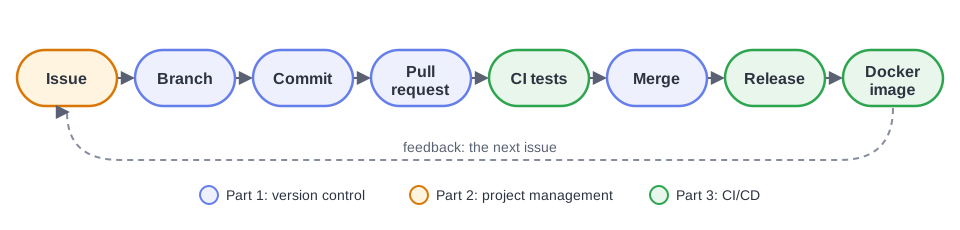
Agenda
| Time | Part | What you do |
|---|---|---|
| 0:00 | Welcome | Why version control? Git vs GitHub. Setup check |
| 0:10 | 1. Version control | git init, commit, push to GitHub, branch, pull request, merge conflict |
| 0:45 | 2. Project management | Issues, labels, a milestone, a project board; fix a bug with a pull request that closes its issue |
| 1:10 | 3. CI/CD | A GitHub Actions workflow, a protected main, red then green, Docker, release v1.0.0 |
| 1:50 | 4. Wrap-up | Recap, quiz, questions, take-home challenges |
The materials
- Slides
- What the presenter shows. Open them full screen at
https://
chebil .github .io /workshops /github /deck/. - Labs: Part 1, Part 2, Part 3
- Every step and every command. Follow along live, or redo the workshop on your own afterwards. Each page has a PDF version in its download menu.
- The sample project
calc-app.zip: the starter project you begin with.calc-app-final.zip: the project as it is at the end of the workshop. Use it to catch up if you fall behind, or to check your work.
- Cheat sheet
- The commands and syntax of the day, on one page.
- Presenter guide
- For instructors: the minute-by-minute run sheet, preparation and common problems.
Conventions in these pages
Replace
<you>with your GitHub username, and#3,#4, ... with your own issue numbers.Commands are typed in a terminal: Git Bash on Windows, Terminal on macOS and Linux. The lines that start with
#are comments; you do not need to type them.Steps marked ✅ Checkpoint are where the presenter pauses. Check that you got the same result, and say so in the chat.