What you built in two hours
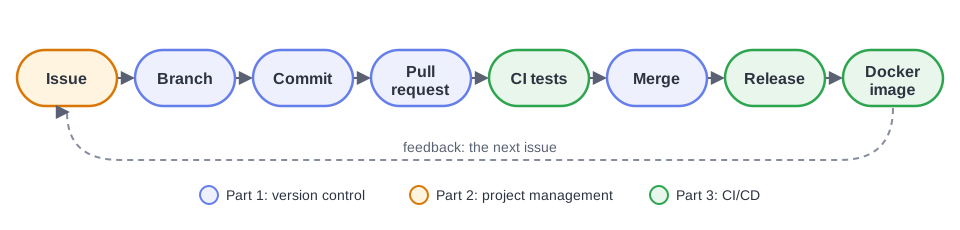
A Git history with branches, pull requests, a code review comment and a resolved merge conflict.
A plan: four issues with labels, a milestone that reached 100% and a project board that updated itself.
A CI pipeline that tests every change, and a protected
mainthat refuses anything red.A CD pipeline that publishes a versioned Docker image, and a
v1.0.0release that anyone can run with one command.
That is the daily loop of most software teams. The tools change from one company to another; the loop stays the same.
Check yourself
1. What is the difference between Git and GitHub?
Git is a version control program that runs on your computer and records the history of a project. GitHub is a website that hosts Git repositories and adds collaboration tools: pull requests, issues, projects, Actions, packages.
2. You changed three files but want to commit only two. How?
Stage only those two, then commit: git add file1 file2, then
git commit -m "...". The staging area exists precisely so that you choose
what goes into each snapshot.
3. What does git pull do?
It downloads the new commits from the remote (git fetch), then merges them
into your current branch (git merge).
4. Why open a pull request instead of committing to main?
main stays working at all times. A pull request lets others discuss and
review the change, and lets CI test it, before it reaches main. It
also documents why the change was made.
5. A file contains <<<<<<<, ======= and >>>>>>>. What happened, and what do you do?
A merge conflict: two branches changed the same lines. Edit the file into
the version you want, delete the three marker lines, then git add the file
and git commit to finish the merge.
6. How do you make a pull request close issue #12 automatically?
Write Closes #12 (or Fixes #12, Resolves #12) in its description. The
issue closes when the pull request is merged into the default branch.
7. Milestone or project: what’s the difference?
A milestone groups the issues of one repository toward a goal or a date, usually a release, and shows the percentage done. A project is a board or table that organises work, possibly across several repositories, with custom fields, views and automation.
8. In a workflow, what is the difference between uses: and run:?
uses: runs a published, reusable action (for example
actions/checkout@v6). run: runs a shell command on the runner (for
example pytest -v).
9. Why does the publish job say needs: test?
So that it starts only after test has succeeded. If the tests fail,
nothing is published: a broken version can never reach the registry.
10. Image or container?
An image is a packaged, read-only template: the app plus everything it needs. A container is a running instance of an image. One image can run as many containers as you like, on any machine with Docker.
11. Where does secrets.GITHUB_TOKEN come from?
GitHub creates it automatically at the start of every workflow run, and it
expires when the job ends. The permissions: key decides what it may do,
for example packages: write. You never create or store it yourself.
Take-home challenges
Each one practises the full loop: open an issue first, then branch, commit, pull request, green CI, merge.
⭐ Getting comfortable
A status badge. Add the pipeline’s badge to the top of your README:
.A new operation. Add
modulo(the remainder ofa / b), test first. Create a milestonev1.1, and releasev1.1.0. Check that the new image tag appears in Packages.Find the next bug. Call
/api/power?a=10&b=1000. What happens? Report it with the bug form, then fix it. Hint: Python raisesOverflowError; handle it like the division by zero.
⭐⭐ Going further
Test on several Python versions with a matrix: in the
testjob, add the lines below and usepython-version: ${{ matrix.python-version }}. The check names becometest (3.11),test (3.12)... so update the ruleset.strategy: matrix: python-version: ["3.11", "3.12", "3.13"]A linter. Add a step that runs Ruff (
pip install ruff, thenruff check .), and fix what it reports.Team up. Invite a classmate (Settings → Collaborators), set Required approvals to 1 in the ruleset, split the open issues between you, and review each other’s pull requests. Then make a real merge conflict between your two branches, and resolve it.
A pull request template. Add
.github/pull_request_template.mdwith a checklist (“Tests added”, “README updated”, “Closes #”).
⭐⭐⭐ Like a professional
A safer image. Make the container run as a non-root user (
useraddandUSERin the Dockerfile) and add aHEALTHCHECK.Continuous deployment. After
publish, deploy the image to a cloud service automatically (for example Google Cloud Run, Azure Container Apps, Render or Fly.io). Store its credentials as a repository secret, never in the code.Automatic updates. Add
.github/dependabot.ymlso that Dependabot opens pull requests when Flask, pytest or the actions you use publish a new version. Your CI then tells you whether the update is safe.
Keep learning
Learn Git Branching: an interactive, visual game that teaches branching, merging and rebasing.
Pro Git: the complete Git book, free online.
GitHub Skills: short interactive courses that run inside your own repository.
The cheat sheet of this workshop.