Time: 40 minutes. You make GitHub test every change automatically,
forbid merging anything that breaks the tests, package the app as a Docker
image, and publish that image automatically when you release version
1.0.0.
The ideas in three minutes
Continuous integration (CI): every push and every pull request is built and tested automatically, so problems are found within minutes, by a machine, and not weeks later by a user.
Continuous delivery (CD): every change that passes the tests is automatically packaged into something ready to run: here, a Docker image in a registry. Continuous deployment goes one step further and also puts it into production automatically.
GitHub Actions runs both. Its vocabulary:
| Term | Meaning |
|---|---|
| Workflow | An automated process, described in a YAML file in .github/workflows/ |
| Event | What starts a workflow: a push, a pull_request, a tag, a schedule, a button... |
| Job | A group of steps that runs on one machine. Jobs run in parallel unless one needs another |
| Step | One command (run:) or one ready-made action (uses:) |
| Runner | The machine running the job: a fresh virtual machine from GitHub, deleted afterwards |
Standard runners are free and unlimited for public repositories.
Docker packages an application with everything it needs (Python, libraries, code) into an image. A container is a running instance of an image, and runs the same on every machine. That solves “but it works on my machine!”. A Dockerfile is the recipe for an image, and a registry stores and distributes images, like GitHub does for code.
By the end of this part, your pipeline looks like this:
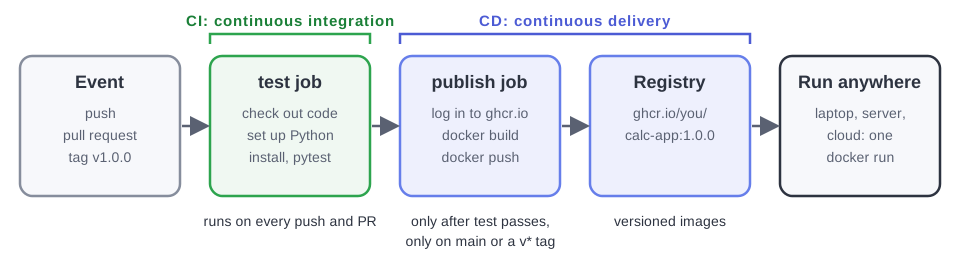
3.1 Your first workflow: test every change (CI)
Start a branch for issue #6:
git switch main
git pull
git switch -c setup-ci
mkdir -p .github/workflows
Create the file .github/workflows/ci-cd.yml, with exactly this content.
In YAML, indentation is meaningful: use spaces, never tabs.
name: CI/CD

on:
  push:
    branches: [main]
  pull_request:
    branches: [main]

jobs:
  test:
    runs-on: ubuntu-latest
    steps:
      - name: Check out the code
        uses: actions/checkout@v6

      - name: Set up Python
        uses: actions/setup-python@v6
        with:
          python-version: "3.12"

      - name: Install the dependencies
        run: pip install -r requirements-dev.txt

      - name: Run the tests
        run: pytest -v
Read it from top to bottom:
name: the name shown in the Actions tab.on: the events. Run on every push tomain, and on every pull request that targetsmain.jobs→test: one job, namedtest. That name is what GitHub shows as the status check on pull requests.runs-on: ubuntu-latest: a fresh Ubuntu Linux machine, for this run only.steps: run in order. If one fails, the job stops and turns red.uses: actions/checkout@v6runs a published action that copies your repository onto the runner. The machine starts empty!uses: actions/setup-python@v6installs Python;with:gives it inputs.run:executes a shell command, exactly as you would in your terminal.
Commit, push, and open a pull request, with Closes #6 in its description:
git add .github/workflows/ci-cd.yml
git commit -m "Run the tests on every push and pull request"
git push -u origin setup-ci
On the pull request, a checks box appears: CI/CD / test (pull_request), first yellow (running), then green ✅ after about 30
seconds. Click Details to see the log of every step, including the
output of pytest. The Actions tab of your repository lists every run.
Don’t merge yet. First, make the check mandatory.
3.2 Protect main: no merge without green tests
Right now, nothing stops anyone from merging a pull request with failing
tests, or from pushing straight to main. A branch ruleset fixes that.
Settings tab → in the sidebar, Rules → Rulesets → New ruleset → New branch ruleset.
Ruleset name:
protect-main. Enforcement status: Active.Under Target branches: Add target → Include default branch.
Under Branch rules, keep Restrict deletions and Block force pushes, and also tick:
Require a pull request before merging. Leave Required approvals at
0: you are working alone. A team would set it to 1 or more.Require status checks to pass → Add checks → type
test→ select it. It is offered because it already ran once, on your PR.
Click Create.
Back on the pull request, it now says that the test check is
Required. It is green, so merge it. Issue #6 closes.
3.3 Red, then green: add a feature test-first
Issue #4 asks for a power operation. Write the test first, and watch
it fail:
git switch main
git pull
git switch -c add-power
In tests/test_calculator.py, import power too, and add a test at the end:
from app.calculator import add, divide, multiply, power, subtractdef test_power():
assert power(2, 3) == 8git commit -am "Test the power operation"
git push -u origin add-powerOpen a pull request with Closes #4. After a few seconds the check turns
red ❌, and the merge button says merging is blocked: the ruleset at
work. Click Details and find the reason in the log of the Run the
tests step:
ImportError: cannot import name 'power' from 'app.calculator'Of course: power doesn’t exist yet. Now implement it in
app/calculator.py, and register it in OPERATIONS:
def power(a, b):
    return a ** b


OPERATIONS = {
    "add": add,
    "subtract": subtract,
    "multiply": multiply,
    "divide": divide,
    "power": power,
}
Keep the documentation in step: in README.md, add power to the
Operations line. Then:
git commit -am "Add the power operation"
git push
The new push re-runs the check on the same pull request: green ✅.
Merge it, and issue #4 closes. If you run the app locally, power now
appears in the page’s menu by itself, because the page lists whatever is in
OPERATIONS.
3.4 Package the app with Docker
Issue #5 is next. Start its branch:
git switch main
git pull
git switch -c add-docker
Create a file named Dockerfile (no extension) at the root of the project:
# 1. Start from an official image that already contains Python.
FROM python:3.12-slim

# 2. Every following command runs inside /app in the container.
WORKDIR /app

# 3. Install the dependencies first. Docker caches this layer, so it is
#    only re-run when requirements.txt changes, not on every code change.
COPY requirements.txt .
RUN pip install --no-cache-dir -r requirements.txt

# 4. Copy the application code.
COPY app/ app/

# 5. Document the port, and say how to start the app. 0.0.0.0 makes the
#    server reachable from outside the container, not just from inside it.
EXPOSE 8000
CMD ["gunicorn", "--bind", "0.0.0.0:8000", "app.main:app"]
Each instruction adds a layer to the image. Docker caches the layers and only rebuilds what changed, which is why the dependencies are installed before the code is copied: changing the code does not reinstall Flask.
Also create .dockerignore, which keeps files out of the image, much like
.gitignore keeps them out of Git:
# Files Docker should not copy into the image: history, tests, local junk.
.git
.github
tests
__pycache__/
*.py[cod]
.pytest_cache/
.venv/
venv/
.env
If you have Docker (or a Codespace), build the image and run a container from it:
docker build -t calc-app .                  # build an image named calc-app from this folder (.)
docker images                               # list your images
docker run --rm -p 8000:8000 calc-app       # start a container
Open http://-p 8000:8000 connects port 8000 of your computer to port
8000 of the container, and --rm deletes the container when it stops. Stop
it with Ctrl+C. In another terminal, docker ps lists the running
containers.
No Docker? No problem: GitHub builds the image for you in the next step.
3.5 Publish the image automatically (CD)
Add a second job to the workflow. Replace the content of
.github/workflows/ci-cd.yml with this; the highlighted lines are new:
# The calculator's pipeline.
#
#   test     CI: runs the tests on every push and every pull request.
#   publish  CD: builds the Docker image and pushes it to the GitHub
#            Container Registry -- only once the tests have passed, and
#            never for a pull request.

name: CI/CD

on:
  push:
    branches: [main]
    tags: ["v*"]
  pull_request:
    branches: [main]
  workflow_dispatch:

jobs:
  test:
    runs-on: ubuntu-latest
    steps:
      - name: Check out the code
        uses: actions/checkout@v6

      - name: Set up Python
        uses: actions/setup-python@v6
        with:
          python-version: "3.12"

      - name: Install the dependencies
        run: pip install -r requirements-dev.txt

      - name: Run the tests
        run: pytest -v

  publish:
    needs: test
    if: github.event_name != 'pull_request'
    runs-on: ubuntu-latest
    permissions:
      contents: read
      packages: write
    steps:
      - name: Check out the code
        uses: actions/checkout@v6

      - name: Log in to the GitHub Container Registry
        uses: docker/login-action@v4
        with:
          registry: ghcr.io
          username: ${{ github.actor }}
          password: ${{ secrets.GITHUB_TOKEN }}

      - name: Work out the image name and tags
        id: meta
        uses: docker/metadata-action@v6
        with:
          images: ghcr.io/${{ github.repository }}
          tags: |
            type=ref,event=branch
            type=semver,pattern={{version}}
            type=sha

      - name: Build and push the image
        uses: docker/build-push-action@v7
        with:
          context: .
          push: true
          tags: ${{ steps.meta.outputs.tags }}
          labels: ${{ steps.meta.outputs.labels }}
What’s new:
tags: ["v*"]also runs the workflow when a version tag such asv1.0.0is pushed.workflow_dispatchadds a Run workflow button to the Actions tab.publishhasneeds: test: it waits fortest, and doesn’t run at all if the tests fail. Nothing broken is ever published.if: github.event_name != 'pull_request': a pull request is only tested, never published. Publishing happens onmainand on tags.permissions: packages: writelets this job push to the GitHub Container Registry (ghcr.io), usingsecrets.GITHUB_TOKEN: a temporary token that GitHub creates for every run. There is no password to manage.docker/metadata-actionworks out the image name,ghcr.io/<you>/calc-app, and its tags:mainfor the latestmain,1.0.0andlatestfor the tagv1.0.0, andsha-1a2b3c4for every commit.docker/build-push-actionrunsdocker build, thendocker push.
Finally, close issue #5 properly: add a Run it with Docker section to
README.md:
## Run it with Docker

No Python needed, only Docker. Build the image and start a container:

    docker build -t calc-app .
    docker run --rm -p 8000:8000 calc-app

Or run the image that the pipeline publishes for every release
(replace `<owner>` with the GitHub account that owns the repository,
written in lowercase):

    docker run --rm -p 8000:8000 ghcr.io/<owner>/calc-app:1.0.0

Then open <http://localhost:8000>. Stop it with Ctrl+C.
Commit everything, push, and open a pull request with Closes #5:
git add .
git commit -m "Package the app as a Docker image and publish it"
git push -u origin add-docker
On the pull request, only test runs; publish is skipped, as
intended. Merge it. Now open the Actions tab: the run on main shows
the two jobs as a graph, test → publish. When it is green, your
repository’s home page shows the image under Packages (right sidebar).
3.6 Release version 1.0.0
A release starts with a tag: a permanent name for one commit.
git switch main
git pull
git tag -a v1.0.0 -m "First release"
git push origin v1.0.0
The tag push starts the pipeline again (Actions tab). This time the
image is published as 1.0.0 and latest.
Turn the tag into a GitHub release:
On your repository’s home page: Releases (right sidebar) → Draft a new release (or Create a new release).
Choose a tag:
v1.0.0.Click Generate release notes: GitHub lists every pull request merged since the start. That’s why good PR titles matter!
Publish release.
Make the image public, so anyone can download it without logging in: open
the package (repository home page → Packages → calc-app) →
Package settings → Change visibility → Public.
Now anyone can run your release with a single command. Your GitHub username goes in lowercase in image names:
docker run --rm -p 8000:8000 ghcr.io/<you>/calc-app:1.0.0Last step: Issues → Milestones. v1.0 is at 100%. Click
Close. On the project board, every card is in Done.
Troubleshooting
The workflow doesn’t appear in the Actions tab
The file must be exactly at .github/workflows/ci-cd.yml, at the root
of the repository, with the extension .yml or .yaml. Check with
git ls-files .github. A YAML syntax error is shown at the top of the
Actions tab: compare your indentation with the example.
“test” is not offered when adding the status check
The check must have run at least once. Push your branch and wait for the
workflow to finish, then add the rule again. The name is the job’s name,
test, not the workflow’s.
git push is rejected: “Changes must be made through a pull request”
That’s the ruleset doing its job. Commit on a branch and open a pull
request. If you already committed on main locally, move that commit to a
branch: git switch -c my-fix, then git push -u origin my-fix, then
git switch main and git reset --hard origin/main.
The publish job fails with “denied” or “permission_denied: write_package”
The job needs permissions: with packages: write, exactly as in the
example. If a package named calc-app already exists in your account from
an earlier attempt, open its Package settings → Manage Actions
access, and give your repository Write access.
“repository name must be lowercase”
Docker image names must be lowercase. docker/metadata-action converts
ghcr.io/${{ github.repository }} for you; when you type an image name
yourself, write your username in lowercase.
docker run ghcr.io/... says “unauthorized” or “denied”
The package is still private. Make it public (step 3.6), or log in first
with docker login ghcr.io.
What you learned
GitHub Actions workflows, events, jobs, steps, actions and runners; status
checks and branch rulesets; test-first development; Dockerfiles, images,
containers and registries; job dependencies with needs; GITHUB_TOKEN and
permissions; tags, releases and versioned images. Finish with the
Wrap-up.