GitHub
Version control · Project management · CI/CD
Dr. Khalil Chebil
Materials, labs and these slides:
chebil.github.io/workshops/github
Today: one project, one loop
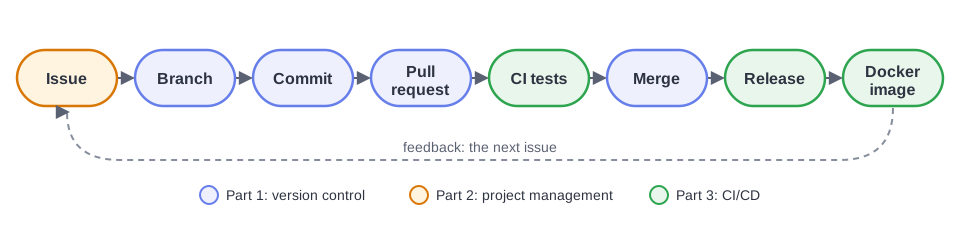
You build calc-app, a tiny web calculator, and take it from its very first
commit to a published Docker image — exactly the way software teams work.
Agenda
| Time | Part | You will |
|---|---|---|
| 0:00 | Welcome | Why version control? Git vs GitHub |
| 0:10 | 1. Version control | commit, push, branch, pull request, merge conflict |
| 0:45 | 2. Project management | issues, labels, milestone, project board |
| 1:10 | 3. CI/CD | GitHub Actions, protected branch, Docker, release |
| 1:50 | Wrap-up | recap, quiz, questions, challenges |
You watch, then you do the same in your own GitHub account. The lab pages have every step.
Before we start
You need:
- a GitHub account, and you are signed in
git --versionworks- Git can sign in to GitHub (
gh auth login) - a terminal (Git Bash on Windows) and an editor
Not ready?
Follow page 0. Before the Workshop while we talk about the ideas. It takes about 10 minutes.Fell behind later? Download
calc-app-final.zip: the finished project.
✅ Post a ✅ in the chat when git --version prints a version.
Why version control?
report.docx
report_v2.docx
report_v2_final.docx
report_v2_final_FIXED.docx
report_v3_final_really_final.docx
report_v3_final_really_final (1).docx
Sound familiar? Now imagine it with 5 people and 500 files.
A version control system records the history of a project:
- Undo: go back to any earlier version
- Who, when, why: every change is signed and explained
- Parallel work: try ideas without breaking what works
- Collaboration: merge everyone's work safely
Git is not GitHub
Git
- a program on your computer
- records the history of a folder
- works offline
- created in 2005 by Linus Torvalds, for Linux
GitHub
- a website that hosts Git repositories
- adds collaboration: pull requests, reviews
- and planning, CI/CD, packages…
- alternatives: GitLab, Bitbucket, Gitea
Git works without GitHub. GitHub is built on Git.
Version control with Git and GitHub
Commit, push, branch, pull request, merge conflict.
A commit is a snapshot
3f9e2a1Add the calculator app
Amira · Mon 10:02
8c41d07Add the maintainer to the README
Amira · Mon 10:15
b27f5e9Add API examples to the README
Youssef · Mon 11:40
- A commit records the state of every file, plus author, date and a message
- It is identified by a hash:
3f9e2a1 - Each commit points to its parent: the history is a chain
- A repository is the project folder plus its whole history (
.git)
Where your changes live
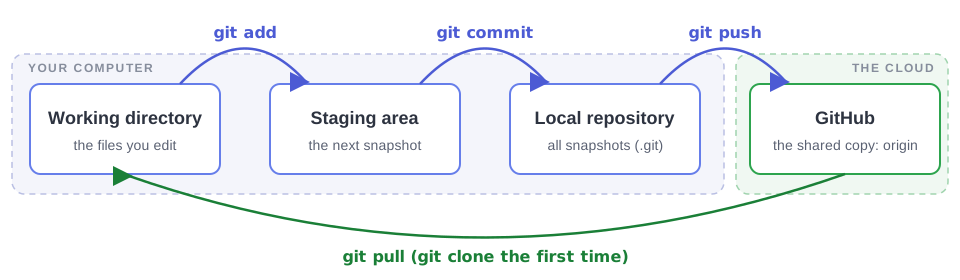
The staging area lets you choose what goes into the next snapshot: you can commit two files out of the three you changed.
cd ~/Downloads/calc-app          # the folder you extracted from calc-app.zip
git init                          # make it a repository
git status                        # what does Git see?
git add .                         # stage everything
git commit -m "Add the calculator app"

echo "SECRET_KEY=do-not-share" > .env
git status                        # .env is ignored, thanks to .gitignore

# on GitHub: + → New repository → calc-app, Public, no README
git remote add origin https://github.com/<you>/calc-app.git
git branch -M main
git push -u origin main
✅ Paste the link to your repository in the chat.
The daily loop
git status     # what changed?
git diff       # how exactly?
git add README.md
git commit -m "Add the maintainer to the README"
git push
A good commit message
says what the commit does, in the imperative:
✅ Fix the division by zero
✅ Add a power operation
❌ update ❌ stuff ❌ asdf
Branches and the GitHub flow
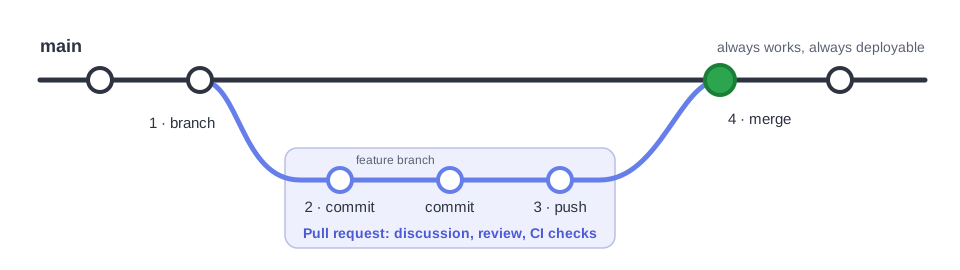
mainalways works. Nobody commits to it directly- every change gets its own branch, and is merged through a pull request
Anatomy of a pull request
- Conversation: what and why, the discussion
- Commits: the commits on the branch
- Files changed: the diff, with line comments
- Review: comment, approve or request changes
- Checks: automated tests (Part 3)
- Merge: the branch joins
main
It keeps the history of decisions: months later you can still read why a line changed.
git switch -c add-examples              # create a branch, switch to it
# edit README.md: add an "Examples" section
git add README.md
git commit -m "Add API examples to the README"
git push -u origin add-examples         # publish the branch

# on GitHub: Compare & pull request → Create pull request
#            Files changed: comment a line → Merge → Delete branch

git switch main
git pull                                # bring the merge back
git log --oneline --graph
Merge conflicts
Two branches changed the same line. Git can't guess, so it asks you:
<<<<<<< HEAD
  <h1>My Calculator</h1>
=======
  <h1>Team Calculator</h1>
>>>>>>> origin/main
To resolve
- Edit the file into the version you want
- Delete the three marker lines
git addthe file, thengit commit
It is not an error. It is Git being careful.
"Teammate", on GitHub
Editapp/main.py on main:<h1>Team Calculator</h1>
You, locally
Edit the same line on a branch:<h1>My Calculator</h1>
git switch -c rename-title
git commit -am "Rename the page title"
git fetch origin
git merge origin/main          # CONFLICT! Fix the file, then:
git add app/main.py
git commit -m "Merge main into rename-title"
git push -u origin rename-title  # then a pull request, and merge
✅ Two merged pull requests in your repository.
What you can do now
git init · clone | start a repository / copy one from GitHub |
git status · diff · log | see what changed, and the history |
git add · commit | stage, then record a snapshot |
git push · pull · fetch | exchange commits with GitHub |
git switch -c · merge | branch, and bring branches together |
| Pull request | propose, review and merge a change |
Project management on GitHub
Issues, labels, milestones, project boards.
Code is only half of a project
Every team constantly asks:
- What needs doing?
- Who is doing it?
- When is it due?
- Is it done?
- → Issues and labels
- → Assignees
- → Milestones
- → Project boards, and issues closed by pull requests
Keeping the plan next to the code means it can update itself when the code changes.
Issues
- one unit of work: a bug, a enhancement, a task
- a title, a description, a discussion
- labels to classify, assignees to own
@namenotifies someone;#12links to issue 12- [ ] tasklists track progress- open, then closed
Issue templates
Forms that ask the right questions ("Steps to reproduce", "Expected", "Actual").They are files in the repository:
.github/ISSUE_TEMPLATE/
Milestones and projects
Milestone
A set of issues with a goal and a due date. Usually a release:v1.0.
Shows % complete.
Project
A board, table or roadmap of issues, across repositories, with custom fields and automation.Link the code to the work
In the pull request description:
Dividing by zero now returns a clear 400 error.

Closes #3
Merge the pull request, and GitHub does the rest:
Also works: Fixes #3, Resolves #3, in a PR or a commit message.
- Create 4 issues:
- bug Dividing by zero crashes
- enhancement Add a power operation
- documentation Run with Docker
- ci Set up CI (a new label)
- Milestone
v1.0, with all four - Project board:
Calc App roadmap - Fix the bug on a branch; PR with
Closes #3
git switch main
git pull
git switch -c fix-divide-by-zero
# fix app/calculator.py + app/main.py
# add 2 tests
git add .
git commit -m "Return a clear error
  when dividing by zero"
git push -u origin fix-divide-by-zero
✅ Issue #3 closed by your PR · card in Done · milestone at 25%.
CI/CD with GitHub Actions and Docker
Test every change. Ship every release.
CI, CD and CD
Continuous Integration
Every push and pull request is built and tested automatically.Continuous Delivery
Every green change is packaged, ready to release.Continuous Deployment
…and also deployed to production automatically.- problems found in minutes, by a machine, not weeks later by a user
- no more "but it works on my machine"
- releasing becomes boring, and that is the goal
GitHub Actions vocabulary
| Workflow | an automated process: a YAML file in .github/workflows/ |
| Event | what starts it: push, pull_request, a tag, a schedule, a button |
| Job | steps that run on one machine; jobs run in parallel unless one needs another |
| Step | a shell command (run:) or a reusable action (uses:) |
| Runner | a fresh virtual machine from GitHub, deleted after the job |
Standard runners are free and unlimited for public repositories.
Anatomy of a workflow
name: CI/CD

on:
  push:
    branches: [main]
  pull_request:
    branches: [main]

jobs:
  test:
    runs-on: ubuntu-latest
    steps:
      - name: Check out the code
        uses: actions/checkout@v6

      - name: Set up Python
        uses: actions/setup-python@v6
        with:
          python-version: "3.12"

      - name: Install the dependencies
        run: pip install -r requirements-dev.txt

      - name: Run the tests
        run: pytest -v
git switch main
git pull
git switch -c setup-ci
mkdir -p .github/workflows
# create .github/workflows/ci-cd.yml
git add .github/workflows/ci-cd.yml
git commit -m "Run the tests on every
  push and pull request"
git push -u origin setup-ci
# PR with "Closes #6", watch it run
Then: a branch ruleset
Settings → Rules → Rulesets → New branch ruleset- target: the default branch
- require a pull request
- require the status check
test
Then merge the PR.
Red, then green
Add a feature test-first: write the test, watch it fail, then make it pass.
test_powerpower- a failing test proves the test really tests something
- the ruleset makes CI a gate: red pull requests cannot be merged
- the log tells you why:
ImportError: cannot import name 'power'
git switch main && git pull
git switch -c add-power
# tests/test_calculator.py: import power, add test_power
git commit -am "Test the power operation"
git push -u origin add-power        # PR "Closes #4" → ❌ red

# app/calculator.py: add power(), register it in OPERATIONS
git commit -am "Add the power operation"
git push                            # same PR → ✅ green → merge
✅ The Actions tab shows a red run and green runs · milestone at 75%.
Docker in one slide
- Dockerfile: the recipe
- Image: the app packaged with everything it needs: Python, libraries, code. Read-only
- Container: a running instance of an image, isolated from the rest of the machine
- Registry: stores and shares images: Docker Hub,
ghcr.io
docker build -t calc-app .
docker run -p 8000:8000 calc-app
Anatomy of a Dockerfile
# 1. Start from an official image that already contains Python.
FROM python:3.12-slim

# 2. Every following command runs inside /app in the container.
WORKDIR /app

# 3. Install the dependencies first. Docker caches this layer, so it is
#    only re-run when requirements.txt changes, not on every code change.
COPY requirements.txt .
RUN pip install --no-cache-dir -r requirements.txt

# 4. Copy the application code.
COPY app/ app/

# 5. Document the port, and say how to start the app. 0.0.0.0 makes the
#    server reachable from outside the container, not just from inside it.
EXPOSE 8000
CMD ["gunicorn", "--bind", "0.0.0.0:8000", "app.main:app"]
git switch main && git pull
git switch -c add-docker
# create Dockerfile and .dockerignore

docker build -t calc-app .                 # build the image
docker images                              # list images
docker run --rm -p 8000:8000 calc-app      # run a container
# open http://localhost:8000 · stop with Ctrl+C
-p 8000:8000: port 8000 of your machine → port 8000 of the container.
--rm: delete the container when it stops.
No Docker? Watch, or use a Codespace. GitHub builds the image in the next step anyway.
The full pipeline
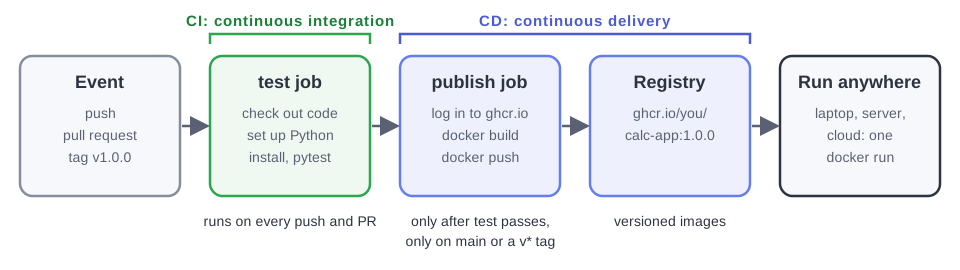
publishneedstest: nothing broken is ever published- pull requests are tested, never published;
mainand tagsv*are published
The publish job
  publish:
    needs: test
    if: github.event_name != 'pull_request'
    runs-on: ubuntu-latest
    permissions:
      contents: read
      packages: write
    steps:
      - name: Log in to the GitHub Container Registry
        uses: docker/login-action@v4
        with:
          registry: ghcr.io
          username: ${{ github.actor }}
          password: ${{ secrets.GITHUB_TOKEN }}

      - name: Work out the image name and tags
        id: meta
        uses: docker/metadata-action@v6
        with:
          images: ghcr.io/${{ github.repository }}
          tags: |
            type=ref,event=branch
            type=semver,pattern={{version}}
            type=sha

      - name: Build and push the image
        uses: docker/build-push-action@v7
        with:
          context: .
          push: true
          tags: ${{ steps.meta.outputs.tags }}
          labels: ${{ steps.meta.outputs.labels }}
# add the publish job to ci-cd.yml
# add "Run it with Docker" to README.md
git add .
git commit -m "Package the app as a
  Docker image and publish it"
git push -u origin add-docker
# PR "Closes #5" → merge → watch
#   test → publish on main

git switch main && git pull
git tag -a v1.0.0 -m "First release"
git push origin v1.0.0
Then, on GitHub
- Releases → new release from
v1.0.0→ Generate release notes - Packages →
calc-app→ make it public - close the
v1.0milestone: 100%!
docker run --rm -p 8000:8000 \
  ghcr.io/<you>/calc-app:1.0.0
✅ Green pipeline · release v1.0.0 · a public image · milestone closed.
What you built
Two hours, one complete loop
- a Git history with branches, PRs and a resolved conflict
- a plan: issues, labels, a milestone, a board
- CI that tests every change, and a protected
main - CD that publishes a versioned Docker image
Quick quiz
- Git or GitHub: which one works offline? Git.
- What does
git pulldo?git fetch+git merge. - How does a pull request close issue #12?
Closes #12in its description. - Why does
publishhaveneeds: test? So nothing broken is ever published. - Image or container: which one runs? The container, an instance of an image.
More questions, with answers: page 4. Wrap-up.
Take-home challenges
- ⭐ a CI status badge in the README
- ⭐ a
modulooperation, released asv1.1.0 - ⭐ find the next bug:
/api/power?a=10&b=1000 - ⭐⭐ test on 3 Python versions with a matrix
- ⭐⭐ team up: a collaborator and real reviews
- ⭐⭐ a linter step (Ruff)
- ⭐⭐⭐ a non-root Docker image with a health check
- ⭐⭐⭐ continuous deployment to the cloud
- ⭐⭐⭐ Dependabot keeps everything up to date
Each one: issue → branch → pull request → green CI → merge. Details on the Wrap-up page.
Questions?
Keep learning: learngitbranching.js.org · Pro Git · GitHub Skills
All the materials:
chebil.github.io/workshops/github
Thank you!